Turning on the vet portal
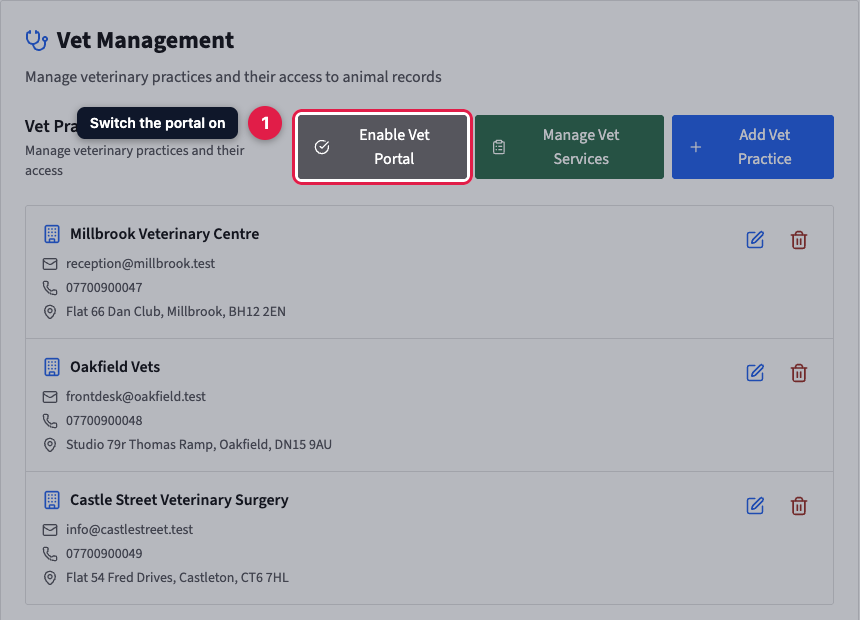
Go to Settings, then Vet Management, and click Enable Vet Portal; it needs a paid plan, and on free vets cannot log in. Manage Vet Services sets the treatments a referring vet can tick and the declaration they must agree to, on the portal and the printable referral form alike. Weights are shared separately, under Settings, then Weight Management.
The vet portal gives the vet practices you work with their own login to PetDesk. A practice sees only the animals you've registered with it. From there it can give consent for the treatment you provide, and refer new clients to you. It's built for physiotherapists, hydrotherapists and RVNs, but any business that works with vets can switch it on.
Paid plans only. On the free plan the Enable Vet Portal button shows a padlock and opens the upgrade options instead. If you move to the free plan later, vets can't log in until you upgrade again. Your consent records and referrals stay where they are.
1. Switch the portal on
Go to Settings and choose Vet Management from the list on the left. This page lists every vet practice you've added. At the top, click Enable Vet Portal.
2. Check it's on
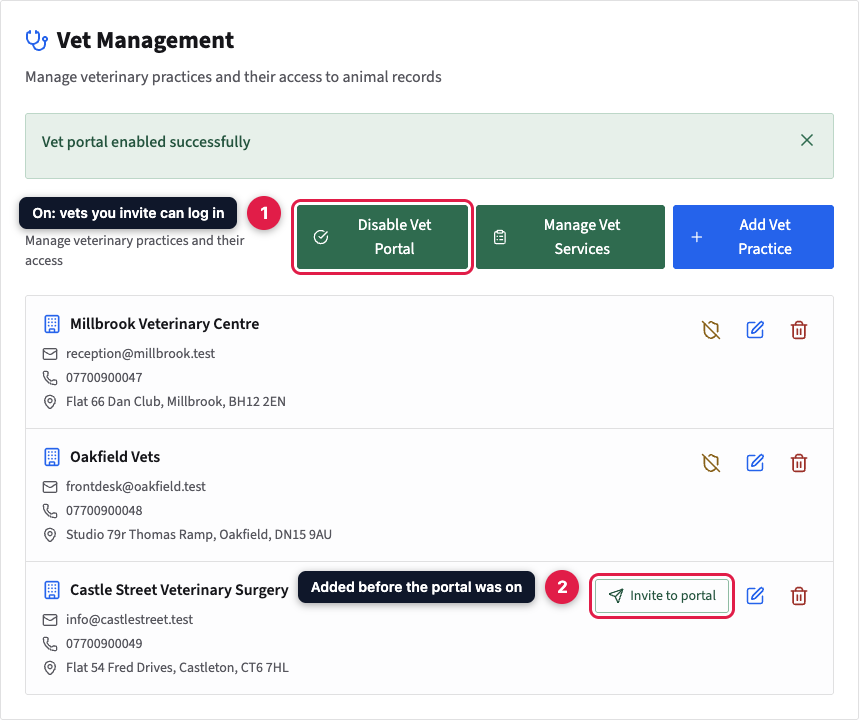
The button turns green and changes to Disable Vet Portal. Practices that already have a login get a shield button for revoking their access. A practice you added before the portal was on has no login yet. Its row shows Invite to portal, which sends it one.
3. Choose which treatments a vet can authorise
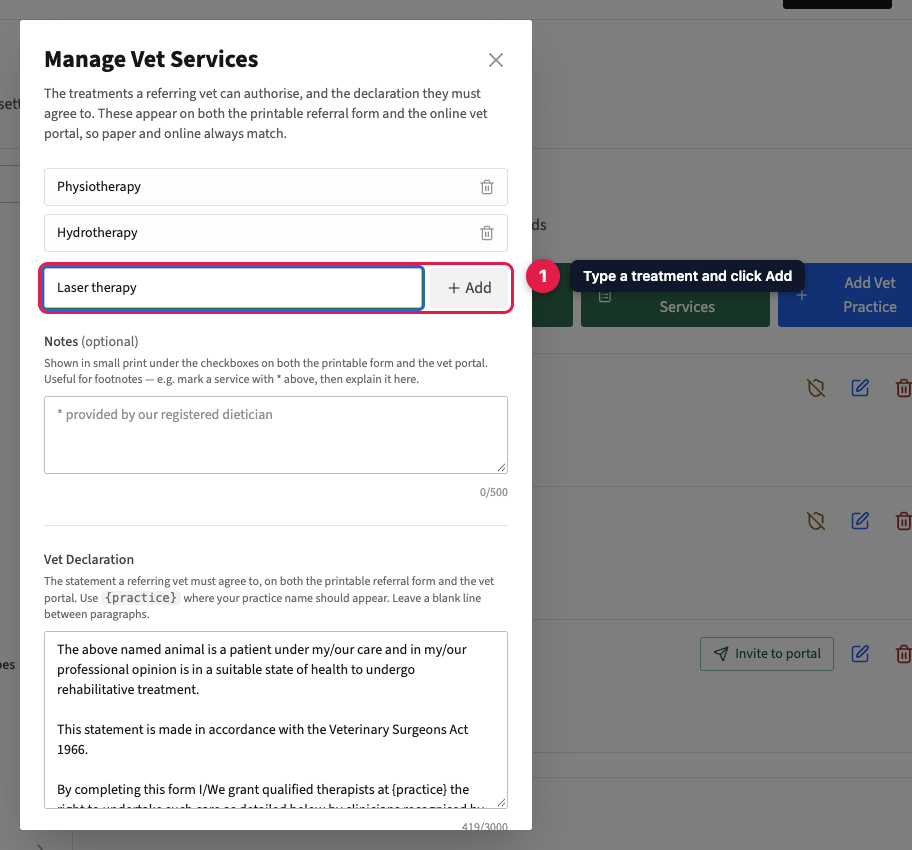
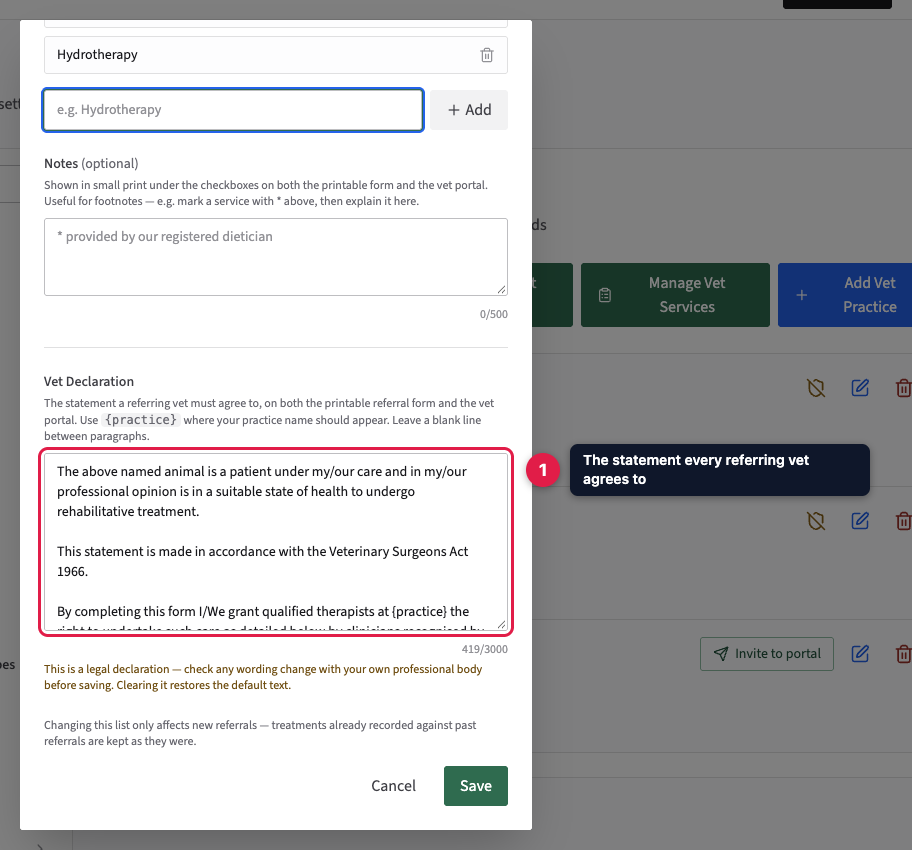
Click Manage Vet Services. The list starts with Physiotherapy and Hydrotherapy. A referring vet ticks the ones they're authorising, on the vet portal and on the printable referral form alike. To add a treatment, type it in the box and click Add. To rename one, edit its text. To remove one, click its bin icon.
Use Notes for small print shown under the tick boxes, for example to explain an asterisk next to a treatment. If you remove every treatment, vets describe what they're authorising in their own words instead.
4. Check the vet declaration, then save
Further down the same window is the Vet Declaration. Every referring vet must agree to it before they can send a referral or a consent. The default wording confirms the animal is under the vet's care and fit for rehabilitative treatment, and refers to the Veterinary Surgeons Act 1966. Wherever you write {practice}, your business name appears.
This is a legal statement, so check any change with your own professional body. If you clear the box, the default comes back. Click Save when you're done. Changes only affect new referrals: past ones keep the treatments and wording they were sent with.
5. Optional: share weights with vets
If you track animals' weights, vets can see them too. Go to Settings, then Weight Management, and switch on Show on the vet portal. Vets then see the recorded weights and target weight of their own animals, without being able to change them. The meal or exercise plan has a separate switch, so you can share the numbers without your plan.
What else changes when the portal is on
- Each animal's record shows its vet consent status, and a booking warns you if the animal doesn't have consent yet.
- Your website gets a Vet portal link, so a practice can find its way to the login page.
- In the customer portal, owners can download a referral form to take to their vet.
- Pending vet referrals appear on your Dashboard.
Turning it off
Click Disable Vet Portal. Vets lose access straight away; anyone logged in is sent back to the login page. Your practices, consent records and referrals are all kept, and switching it back on restores everyone's access.